
Getting Started
Installation
Install V4 Studio in WordPress, then open it from the WordPress menu. Its default variables and classes are added to Elementor during setup.
Before you start
WordPress 6.5 or later
Open Dashboard › Updates to check your WordPress version.
PHP 7.4 or later
Open Tools › Site Health › Info › Server to check your PHP version.
Elementor with the V4 editor
Install and activate the latest stable version of Elementor, then activate its Atomic Editor (V4) to work with variables and classes. V4 Studio is tested with Elementor 4.3.
An administrator account
Sign in as an administrator to install the plugin and change V4 Studio settings.
Install the plugin
1. Download
Download V4 Studio as a ZIP file. Keep the file zipped.
2. Upload
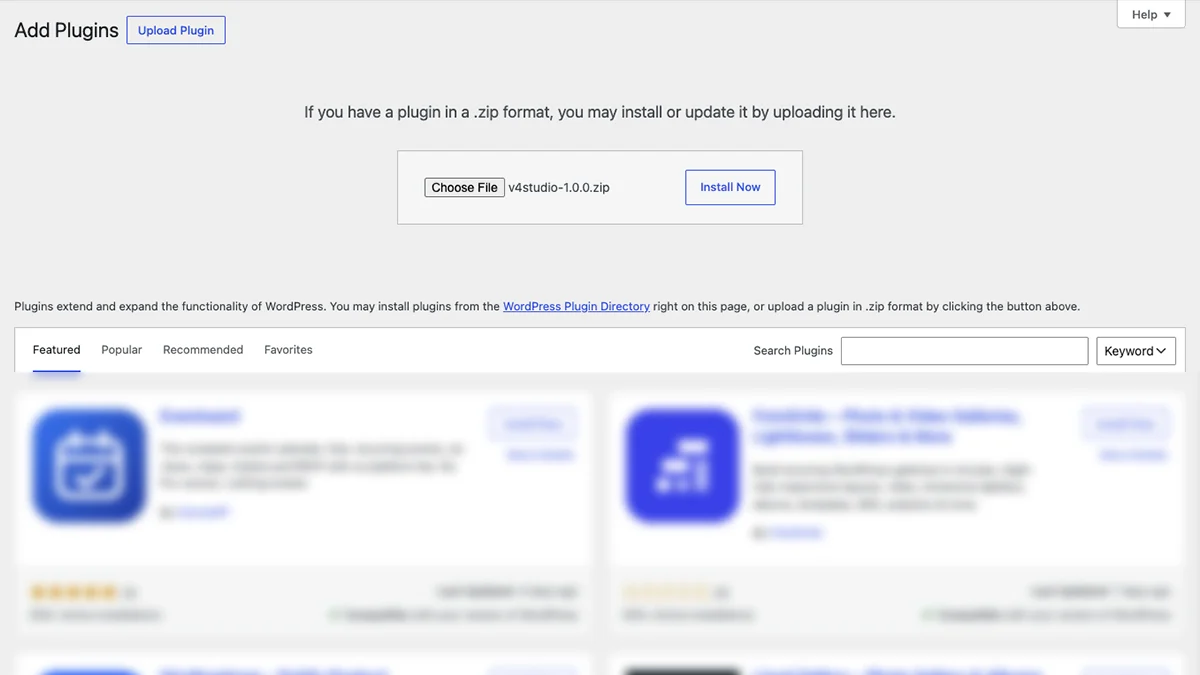
In WordPress, open Plugins › Add New Plugin. Select Upload Plugin and choose the ZIP file.
3. Activate
Select Install Now. When the installation finishes, select Activate Plugin.
4. Open V4 Studio
Select V4 Studio in the WordPress menu. Check that the Variables and Classes tabs contain the default items.
Open V4 Studio after activation to check your setup. Your existing pages keep their current styles until you apply V4 Studio variables or classes to them.
Check that it worked
Edit a page with Elementor and select a V4 element. Open the Style tab and search the class field for button-primary. You should also be able to choose V4 Studio variables in controls that support them, such as colors and text sizes.
Common questions
I activated it, but my pages look the same. Is that normal?
Yes. Existing pages keep their current styles. Open V4 Studio to check the setup, then apply a variable or class in the Elementor V4 editor to use the new styles.
Who can use V4 Studio?
Administrators can open V4 Studio and change its settings. Other users do not see it in the WordPress menu.
What happens if I uninstall it?
Uninstalling V4 Studio removes its saved settings, including Brand Data. Variables and classes already added to Elementor stay in Elementor. Export your setup before uninstalling if you want to keep a copy.
Next
Quick Start
Add your brand details, change a color and apply your first class.