
Guides
Variables
A variable stores a design value, such as a color, font or text size. Change the value and select Import Variables to update every element that uses it.
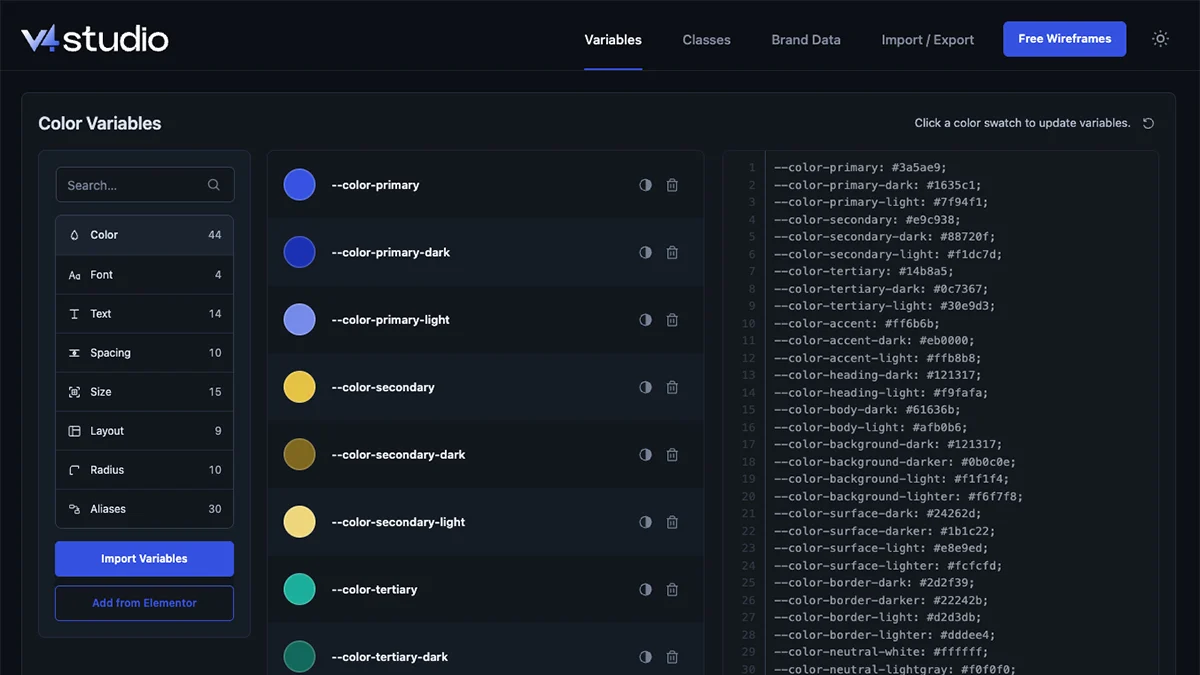
The categories
Color
Brand, text, background, surface, border and status colors.
Font
Fonts for headings, body text, accents and quotes.
Text
Sizes for small text, body text and large headings.
Spacing
Spacing values for section padding and large gaps.
Size
Smaller size values for gaps, icons and other elements.
Layout
Content widths for narrow text columns and wider page layouts.
Radius
Values for square, rounded and fully round corners.
Aliases
Variables named for their use, such as card padding. Each one uses the value of another variable.
Change a variable
1. Find the variable
Open V4 Studio › Variables. Choose a category on the left, or search for the variable by name.
2. Change the value
For a color, select its swatch, choose a color and select Done. For other variables, change the value in the editor below the list.
3. Apply the change
Select Import Variables. The updated value is applied to the elements that use it in Elementor.
Edits in this tab are applied to Elementor when you select Import Variables. Resetting a category applies its defaults as soon as you confirm the reset.
Color tools
Select Generate tints and shades beside a color to create lighter and darker versions. The trash icon removes that color and its generated versions. Select Import Variables to apply your edits.
More tools
Add from Elementor
Adds variables from Elementor that are missing in V4 Studio. It keeps the variables already in V4 Studio.
Reset a category
Select the reset icon at the top of the category panel, then confirm. This restores the category's default values and applies them to Elementor. Export your setup first to keep a copy.
Explore the variables
Foundations
See the design values used on this site, with examples of colors, text sizes and spacing.
Common questions
Why didn't my change show in Elementor?
Select Import Variables after editing the value. If it still does not appear, check the import results for skipped items.
Can I add my own variables?
Yes. Add a line such as --color-brand: #2457a7; to a category's editor. Select Import Variables and check the results.
What are aliases?
An alias is a variable that uses another variable's value. For example, --padding-card: var(--space-sm) uses the space-sm value for card padding. Change the alias and select Import Variables to update the elements that use it.
Next
Classes
Reusable styles for buttons, cards, text and layout.